Sunbase · Campaign orchestration
Marketing Hub
An enterprise campaign platform for building, scheduling, and analyzing Email, SMS, WhatsApp, and Client Portal campaigns in one guided flow.
Overview
Sunbase Marketing Hub is an enterprise campaign orchestration platform for creating, scheduling, and analyzing Email, SMS, WhatsApp, and Client Portal campaigns from one workflow. I led UX/UI consolidation, workflow architecture, the design system, and technical prototyping across a 12-week discovery, architecture-unification, and beta rollout, for marketing managers, account executives, sales reps, and HR and operations admins.
Impact
Marketing depended on five or more disconnected pages and legacy tools, and that fragmentation drove more than 50% of marketing-module complaints and churn feedback. Consolidating it removed the product's largest complaint category. Templates, segmentation, merge fields, scheduling, and dispatch now live in one flow, and pre-flight checks (responsive previews, recipient counts, exclusion controls, delivery-health signals) give teams confidence before they send.
- Campaign creation, scheduling, and dispatch
- Before:
5+ tools. After: 1 flow - Recipient and delivery checks before every send
- Pre-flight
The problem
Users hopped between separate tools for templates, contact filters, SMS setup, scheduling, and reporting. Merge fields had no visual validation, so broken personalization tags reached live messages. Teams couldn't verify desktop and mobile rendering before sending, and delivery failures were hard to diagnose, which made list cleanup reactive and slow.
Research & direction
An audit of the existing tools and 12 discovery sessions with enterprise power users surfaced three priorities. Linear workflows reduce drop-off, so a persistent six-step wizard protects context and prevents accidental data loss. Database marketing needs multiple personas, since users target CRM contacts, candidates, employees, dealers, and customers without switching systems. And analytics must explain failure: bounce and unsubscribe numbers only matter if teams can see why and what to fix. The direction was to consolidate creation, targeting, pre-flight validation, dispatch, and health monitoring into one connected experience.
Design decisions
The builder is a six-step flow: choose a channel, pick a persona-based template, edit in a WYSIWYG editor with validated merge fields, schedule an immediate or recurring send, build the audience across CRM, candidate, employee, user, and dealer databases, and finalize with timing, recipient count, attachments, and previews. Alongside it, an analytics command center tracks sent, active drips, scheduled campaigns, read rate, bounces, and unsubscribes, and breaks delivery failures into causes admins can act on: invalid email, missing domain, spam block, full mailbox.
Visual language
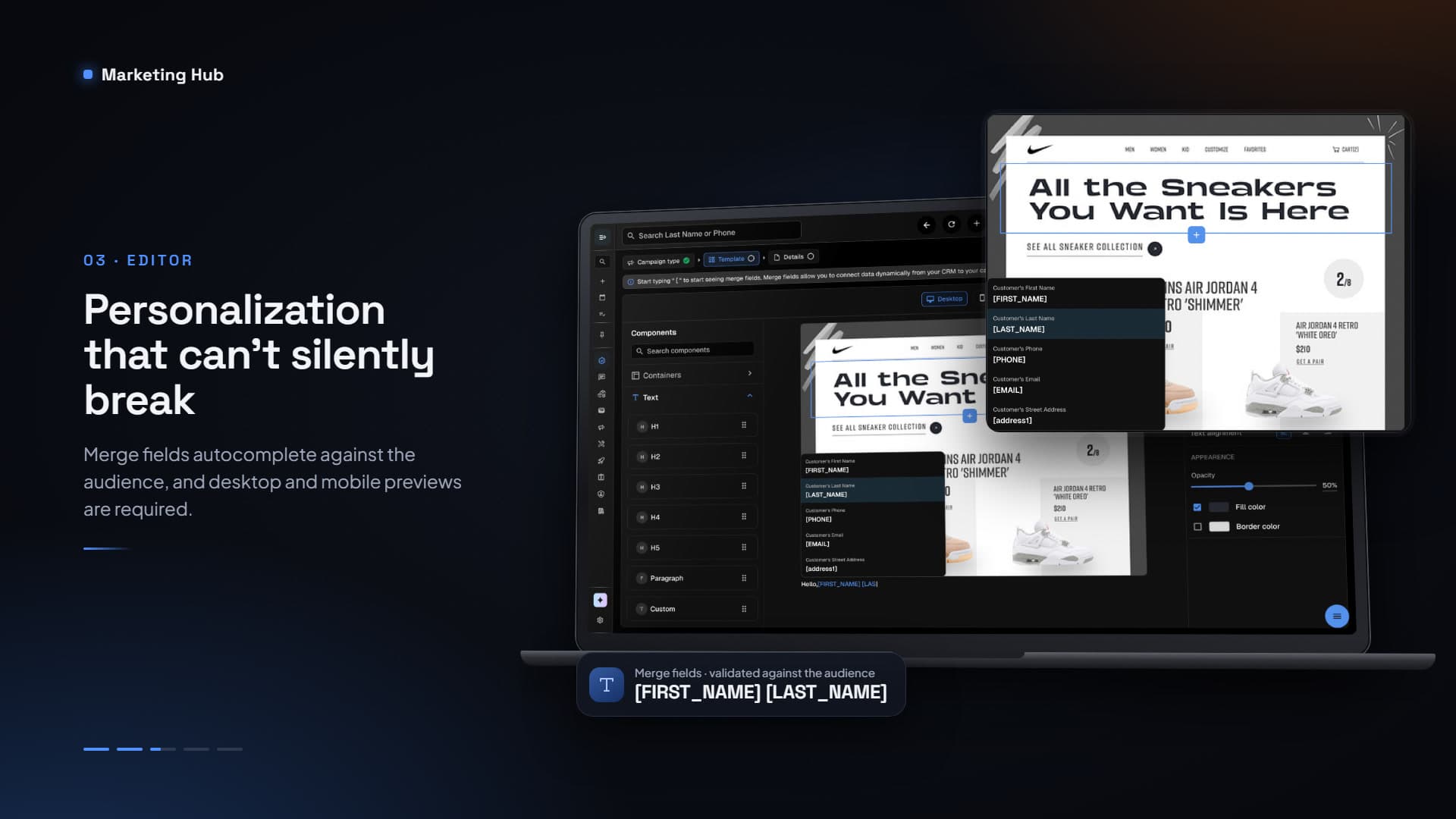
A dark, dense desktop workspace suits campaign management. Persistent breadcrumbs show progress and keep context, and the editor autocompletes merge fields against the selected audience so tags are valid by construction. Desktop and mobile previews are required before finalization, and recipient counts, explicit confirmation, and exclusion actions guard high-volume sends.
Key screens
The walkthrough follows a campaign from its first health metrics to the moment before dispatch: analytics, channel and template, editor, schedule, audience, and pre-flight review.
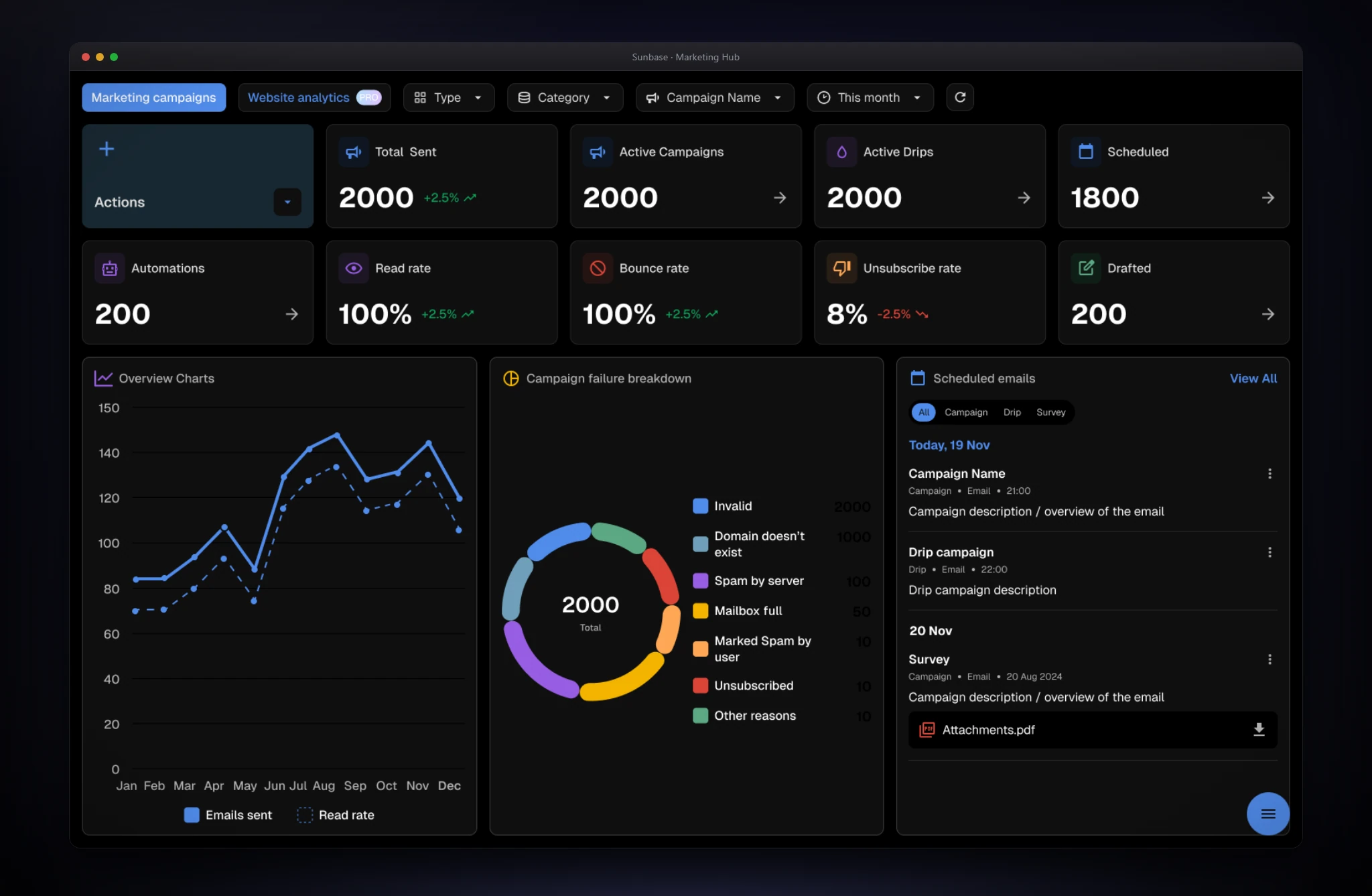
Campaign health, and the reasons behind the failures.
- The screen
- The dashboard opens on Marketing campaigns with filters for type, category, campaign, and period. Metric tiles cover sent, active campaigns and drips, scheduled, automations, read, bounce, and unsubscribe rates, and drafts, each with a trend. Below, a yearly chart compares emails sent with read rate, a donut breaks failures into causes, and a list shows upcoming emails, drips, and surveys.
- The problem
- Bounce and unsubscribe data was only useful in aggregate. Teams couldn't see why messages failed, so database cleanup was reactive and slow.
- Design decisions
- The top row answers "is it working?" with a few large numbers; everything below explains why. The failure donut sorts causes into fixes: invalid addresses call for list cleaning, spam blocks for content or sender changes, so each segment implies an action. Upcoming sends sit next to results, and an Actions tile puts the primary task, creating a campaign, at the start of the page.
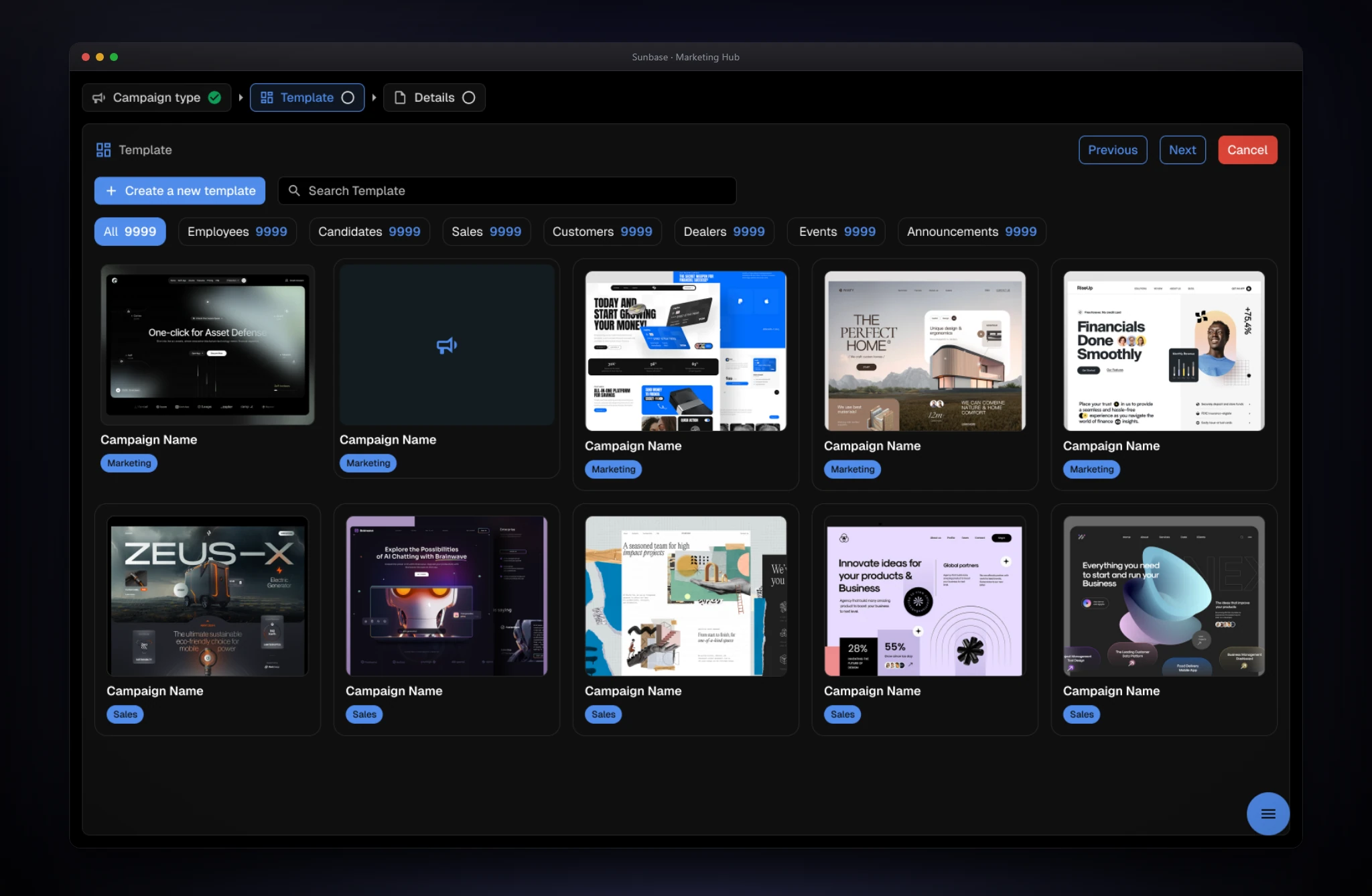
Set the constraints first, then start from a proven template.
- The screen
- The builder starts by choosing a channel: Email, SMS, WhatsApp, or the client portal. The template step is a visual library with persona tabs (Employees, Candidates, Sales, Customers, Dealers, Events, Announcements), counts, search, and Create a new template. A full-screen preview lets users select and proceed, edit, or close.
- The problem
- Users moved between tools for templates, filters, and SMS setup, and started each campaign from a blank page.
- Design decisions
- Choosing the channel first establishes what the rest of the flow can offer, so later steps only show valid options. Templates are organized by persona, the way marketers think about audiences, and shown as thumbnails so the choice is visual. Preview is its own view with a clear commit action, which makes browsing safe. A persistent breadcrumb supports the linear flow research showed reduces drop-off.
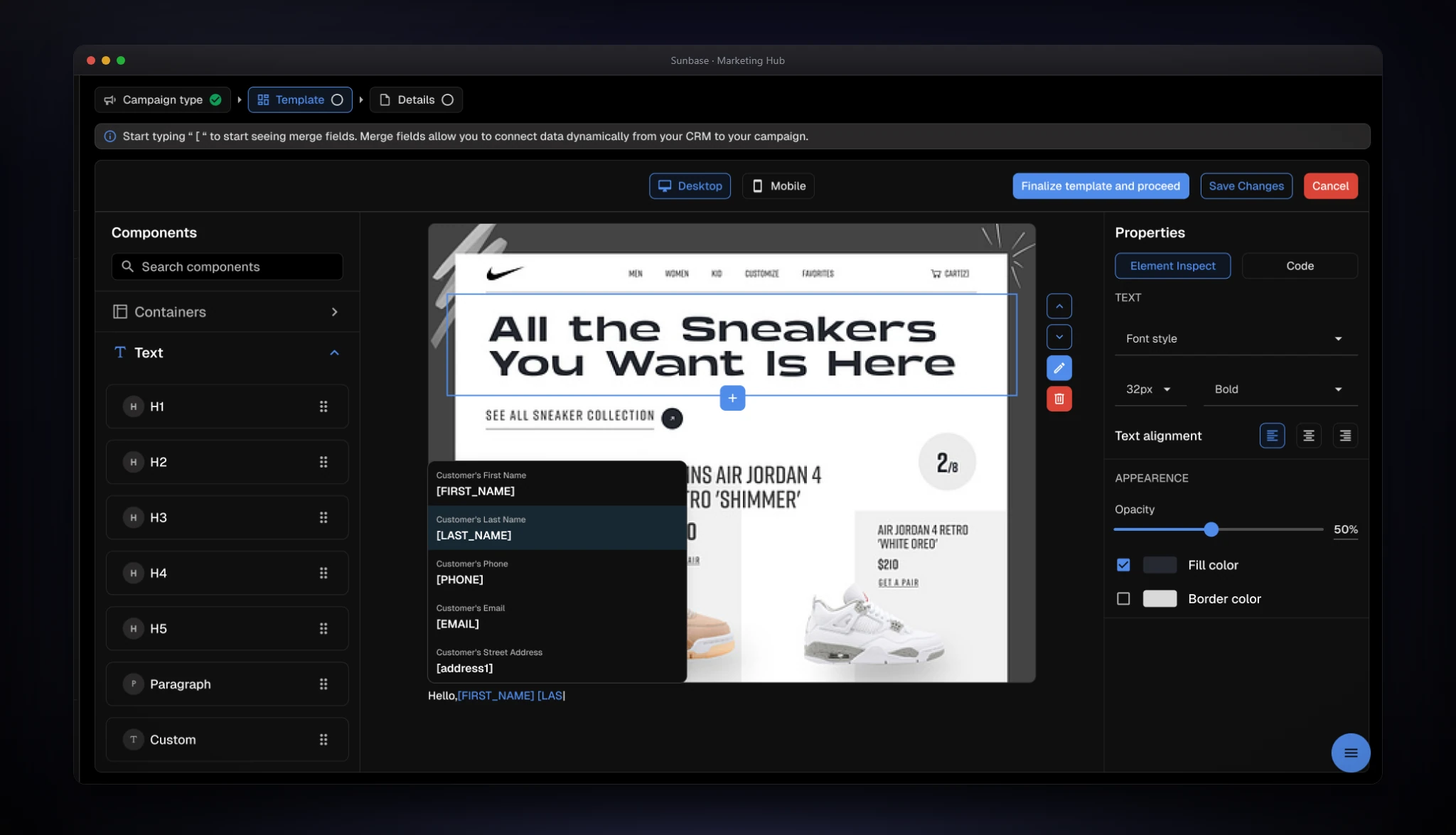
Personalization that can't silently break.
- The screen
- A WYSIWYG canvas sits between a component library (containers and text elements) and an element properties panel for font, size, weight, alignment, opacity, fill, and border. Typing an opening bracket opens a merge-field menu (first name, last name, phone, email, street address), and a banner explains how. A Desktop and Mobile toggle sits above the canvas beside Finalize template and proceed, Save Changes, and Cancel.
- The problem
- Dynamic fields had no visual validation, so broken personalization tags reached live messages, and teams couldn't check how a message would render across devices.
- Design decisions
- The merge-field menu appears where the user is typing and shows a readable name beside each tag, so nobody memorizes syntax or mistypes a field. Fields are validated against the selected audience before insertion. Component-based editing gives structure without HTML, with precise controls in the properties panel. Desktop and mobile preview live in the editor, and a confirmation step asks users to verify both before finalizing.
Send now, later, or on a repeating schedule.
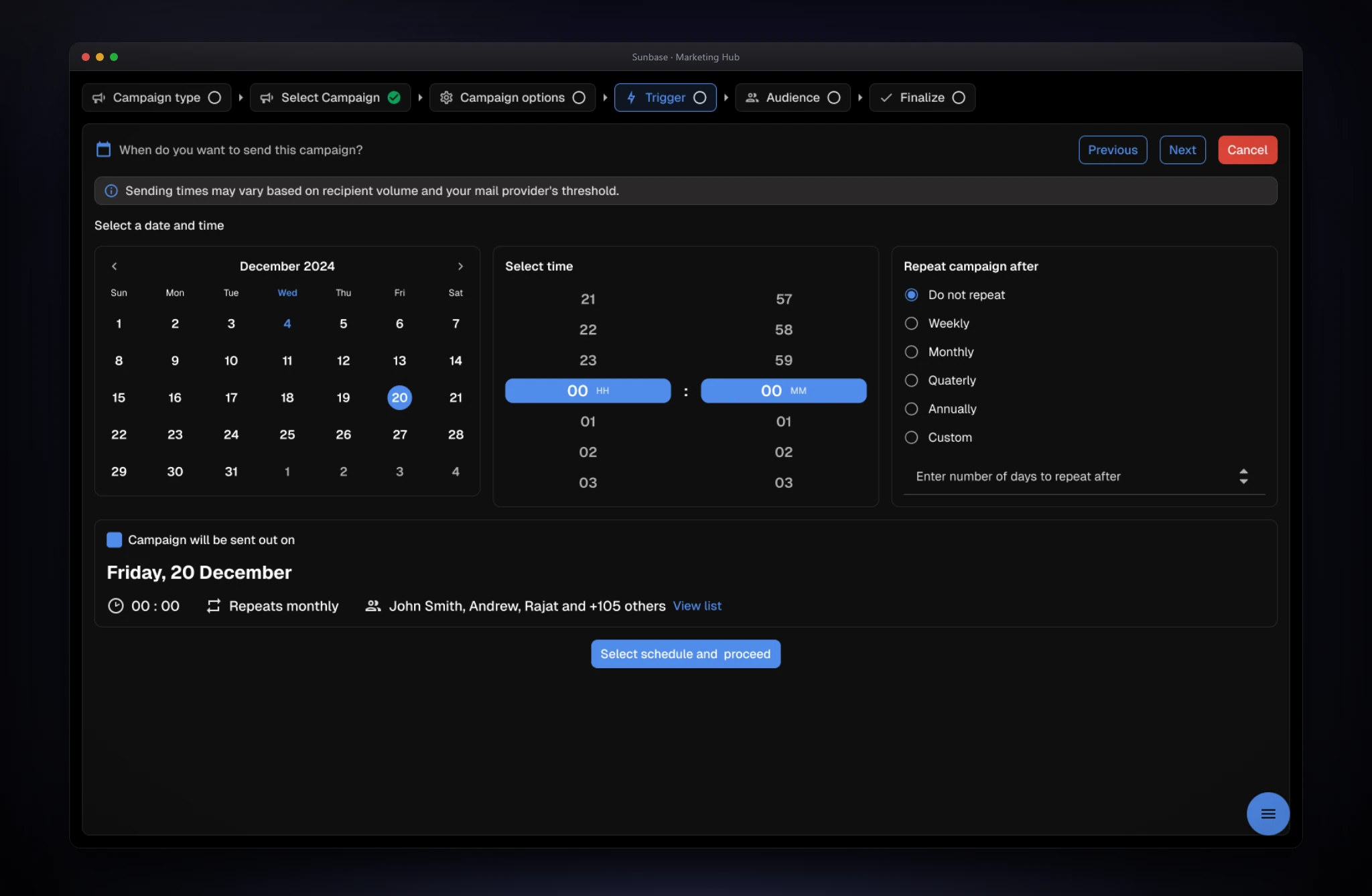
- The screen
- One screen combines a date picker, a time selector, and repeat options: Do not repeat, Weekly, Monthly, Quarterly, Annually, and Custom with a day count. A notice explains that delivery times can vary with volume and mail-provider thresholds, and a summary card restates the result in plain language.
- The problem
- Scheduling lived apart from the rest of the campaign, and recurring sends, drips, and surveys each had their own setup.
- Design decisions
- Calendar, time, and recurrence share a screen, so the whole rule is visible at once. The summary sentence turns configuration into plain language, which makes mistakes visible before they happen, and the notice sets honest expectations about delivery. Custom intervals cover what presets don't without hiding the common options.
Reach the right people, across every database.
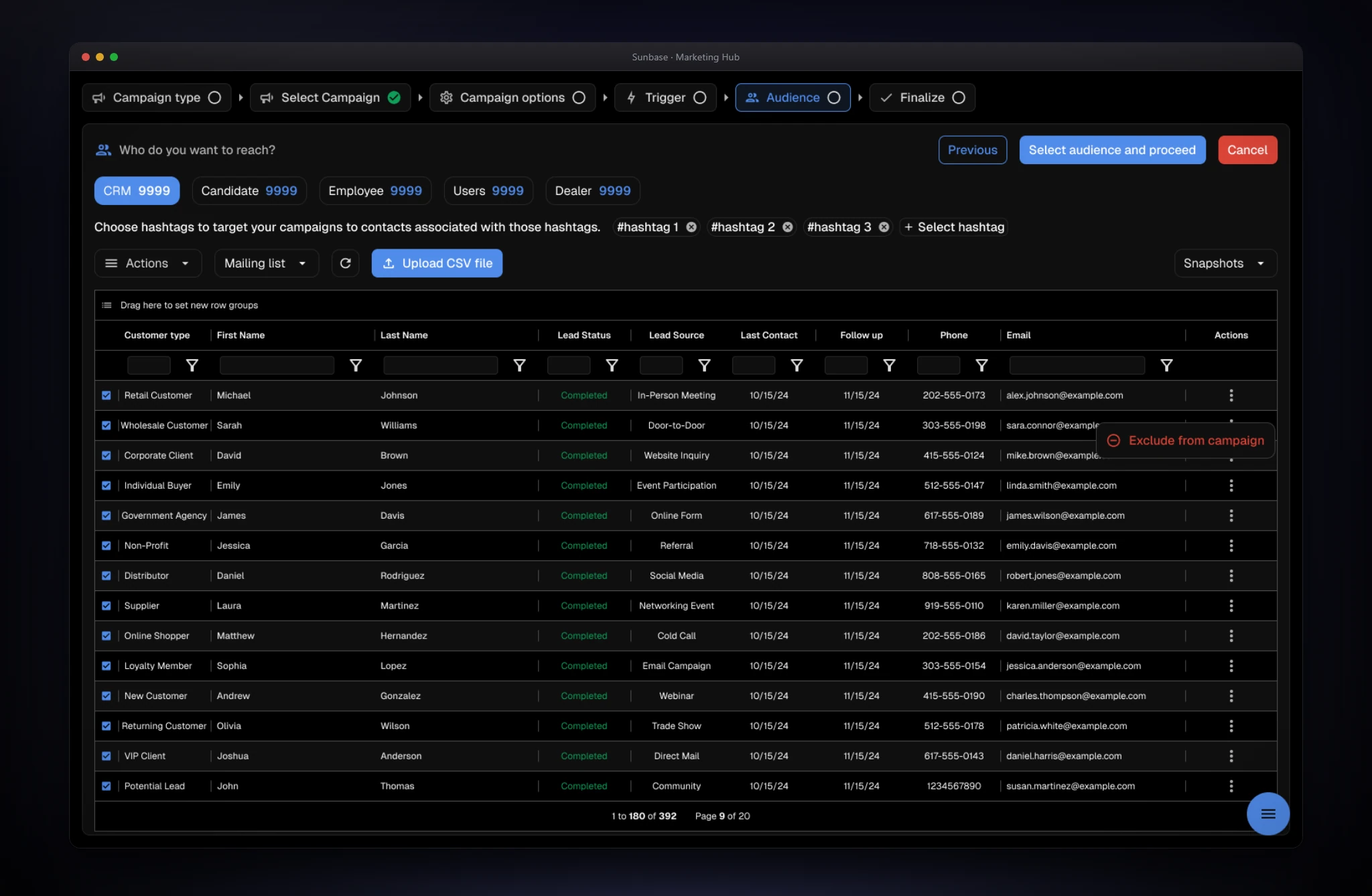
- The screen
- Persona tabs (CRM, Candidate, Employee, Users, Dealer) carry counts, with hashtag chips for targeting associated contacts. A full data grid supports column filters, row selection, and pagination, alongside Upload CSV file, mailing-list and snapshot controls, and a one-click Exclude from campaign action.
- The problem
- Database marketing spans several personas, and teams switched systems to target CRM contacts, candidates, employees, dealers, and customers.
- Design decisions
- Every database is a tab in one place, so targeting doesn't depend on where the data lives. Hashtags give a fast, human way to segment. A full grid keeps the list inspectable: people see exactly who will receive the message instead of trusting a count. Exclusions are one click per row, CSV upload covers lists that live elsewhere, and the selection carries into the final review.
One last look before a high-volume send.
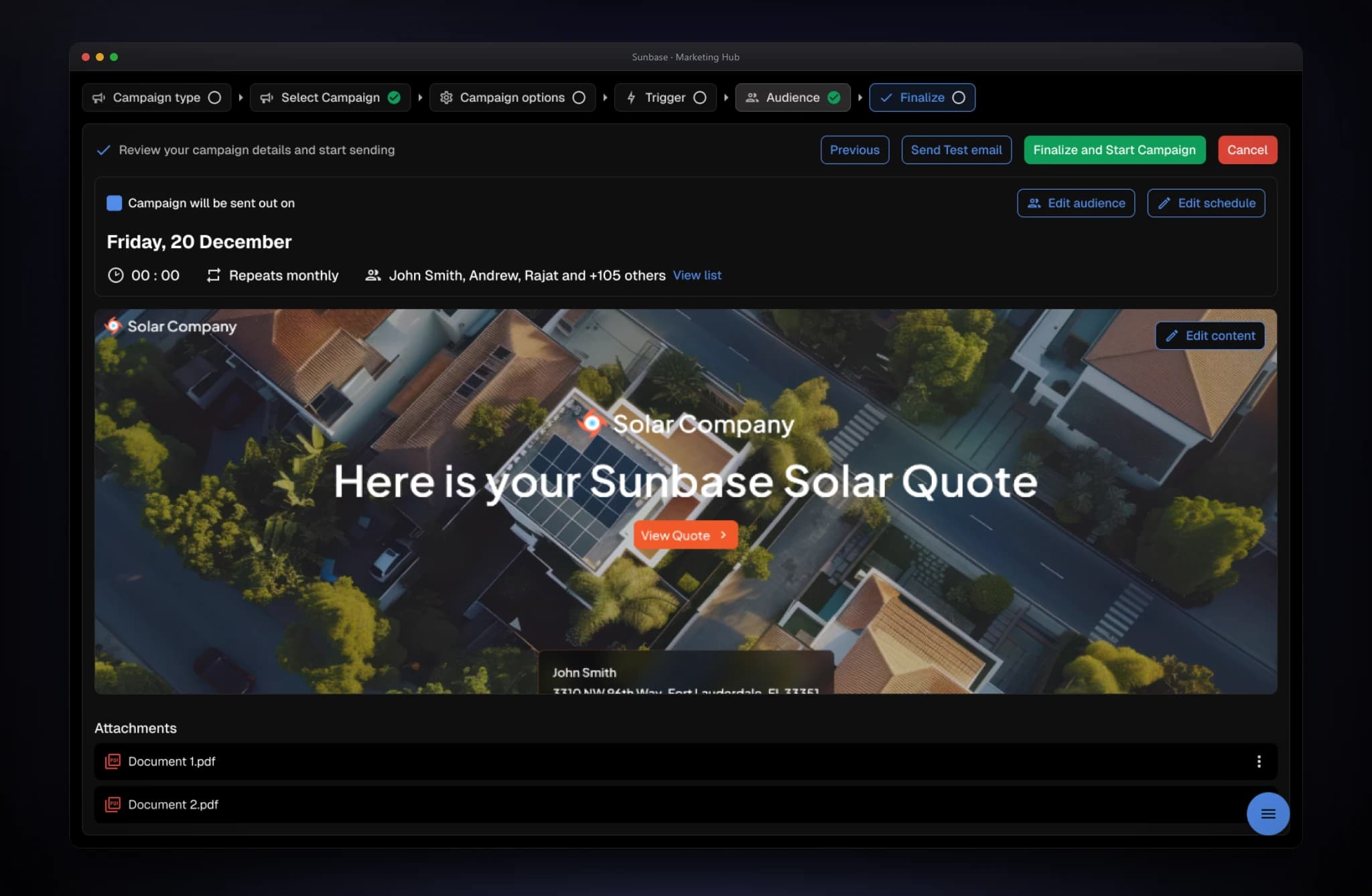
- The screen
- The final step summarizes date, time, repeat rule, and recipients with a link to the full list, plus Edit audience and Edit schedule shortcuts. Below, a rendered preview with Edit content and the attachments. The header offers Previous, Send Test email, and Finalize and Start Campaign, and a success dialog after dispatch offers Go to Dashboard or Test campaign.
- The problem
- Accidental or malformed mass sends are costly, and teams couldn't verify content, timing, and audience together before launch.
- Design decisions
- Everything that can go wrong sits on one screen (timing, audience, content, attachments), each with an edit shortcut, so a fix doesn't mean restarting the flow. A test email lets teams check the real thing before the real send. The final action is a distinct green button separated from navigation, and an explicit confirmation follows dispatch. Recipient details stay visible throughout, in line with the principle of always showing the exact audience.
Edge cases & logic
Broken merge tags are prevented at the source, because autocomplete validates fields against the selected audience database before insertion. Mandatory preview verification catches mobile layout breakage before launch, and a secondary confirmation shows the exact audience count to prevent accidental mass dispatch. Failure charts categorize bounced or invalid emails so admins can clean lists in bulk.
Reflection & next steps
Consolidation created more product value than any new feature would have. Turning a high-friction, high-complaint workflow into a guided system directly improved confidence and retention potential. The safeguards matter as much as the flow: responsive previews, explicit audience counts, validated merge fields, and actionable delivery analytics make high-volume communication safer for enterprise teams. Marketing Hub is now one place to build, verify, launch, and improve omnichannel communications.