Sunbase · Omnichannel CRM
Communication Hub
An enterprise omnichannel CRM workspace that unifies SMS, email, calls, WhatsApp, deal stages, internal collaboration, and AI assistance into one searchable client history.
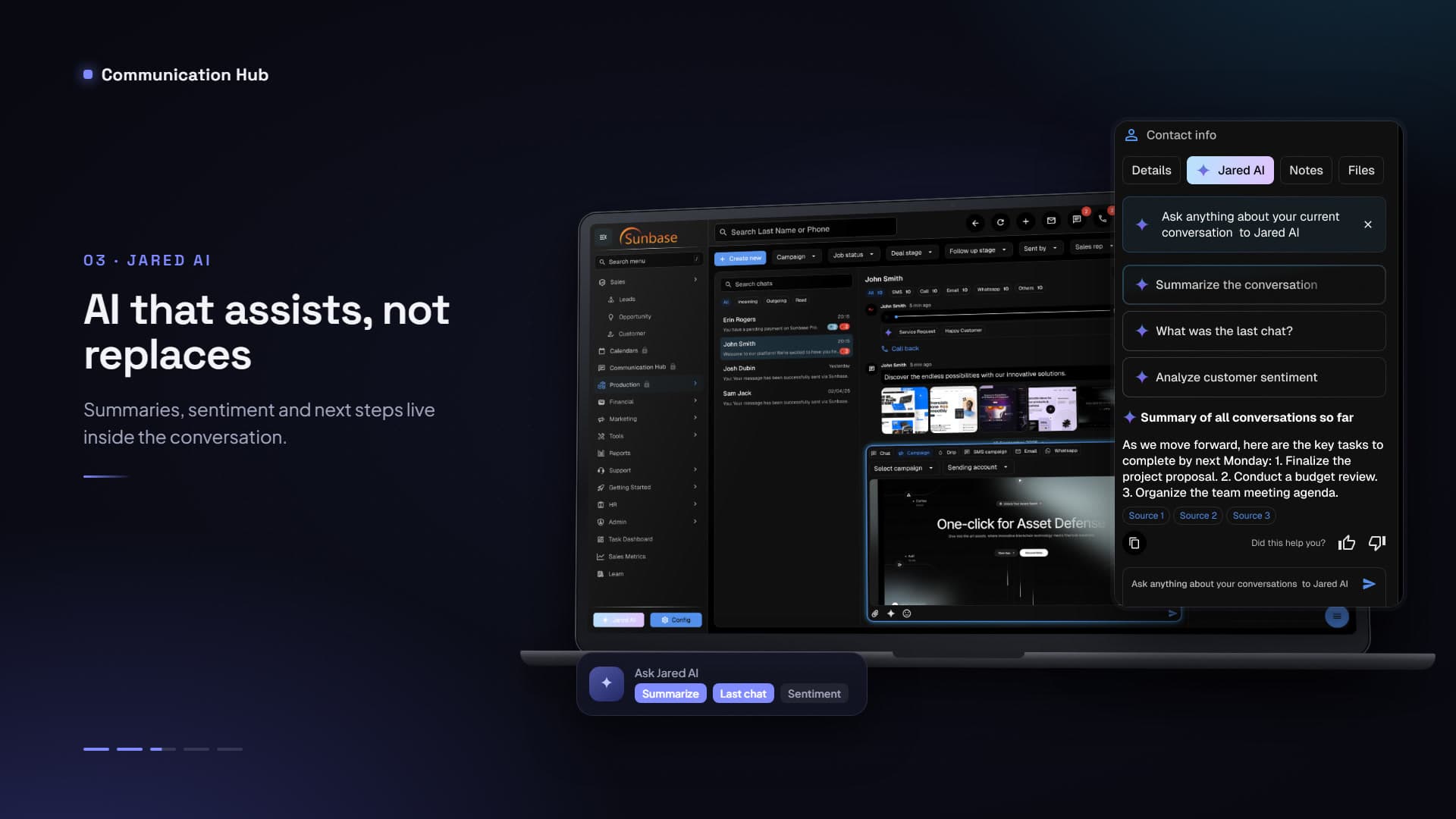
Overview
Sunbase Communication Hub is an enterprise omnichannel CRM workspace that unifies SMS, email, calls, WhatsApp, CRM stages, internal collaboration, and AI assistance into one searchable client history. I led design end to end across a 10-week 0-to-1 strategy and launch: strategy, information architecture, enterprise desktop UX, and AI workflow integration for account executives, sales reps, appointment setters, customer success managers, and operations admins.
Impact
Sales and account teams were losing time switching between messaging channels, CRM records, call logs, and internal tools. A unified tri-pane workspace delivered a 68% reduction in response latency through a centralized inbox, 85% less context-switching through one timeline for messages, calls, media, and deal stages, and 4× faster onboarding and handoffs through Jared AI summaries and sentiment tagging.
- Response latency
- 68% less
- Context-switching
- 85% less
- Onboarding and handoffs
- 4× faster
The problem
Conversations were scattered across SMS, email, WhatsApp, calls, and personal chat tools, and reps had no chronological record of client intent, which led to duplicate or contradictory messages. Contracts, site photos, and invoices were hard to find in unstructured threads, and internal questions meant leaving the client record, slowing deals down.
Research & direction
Discovery with 16 account executives, sales setters, and support administrators surfaced three priorities. Context-switching slowed deal momentum, because reps burned time searching across tools. AI had to assist rather than replace: teams wanted summaries, sentiment signals, and editable drafts, not autonomous replies on high-value deals. And collaboration had to stay inside the client record. The direction was one continuous, searchable timeline with embedded AI and private collaboration layers.
Design decisions
SMS, calls, email, WhatsApp, and automated campaigns share one time-stamped feed, with channel filters to isolate a source without losing the full history. Jared AI, the copilot, summarizes long threads into action points, tags sentiment and intent (Service Request, Happy Customer), and drafts editable replies in Professional, Casual, or Shorter tones. Collaboration is contextual: internal-only notes, @mentions, and tasks live beside the conversation and never reach the client.
Visual language
A tri-pane desktop layout separates navigation, conversation, and intelligence. Color-coded badges distinguish SMS, WhatsApp, email, and call recordings, and global and in-thread search highlights matches across historical conversations. A dedicated drawer organizes images, PDFs, and documents, and inline actions keep replies, AI, metadata, and tasking close to the client record.
Key screens
The walkthrough covers the timeline itself, how reps find things inside it, the AI copilot, private collaboration, and composing with AI while retrieving files.
Every channel, call, and file in one chronological record.
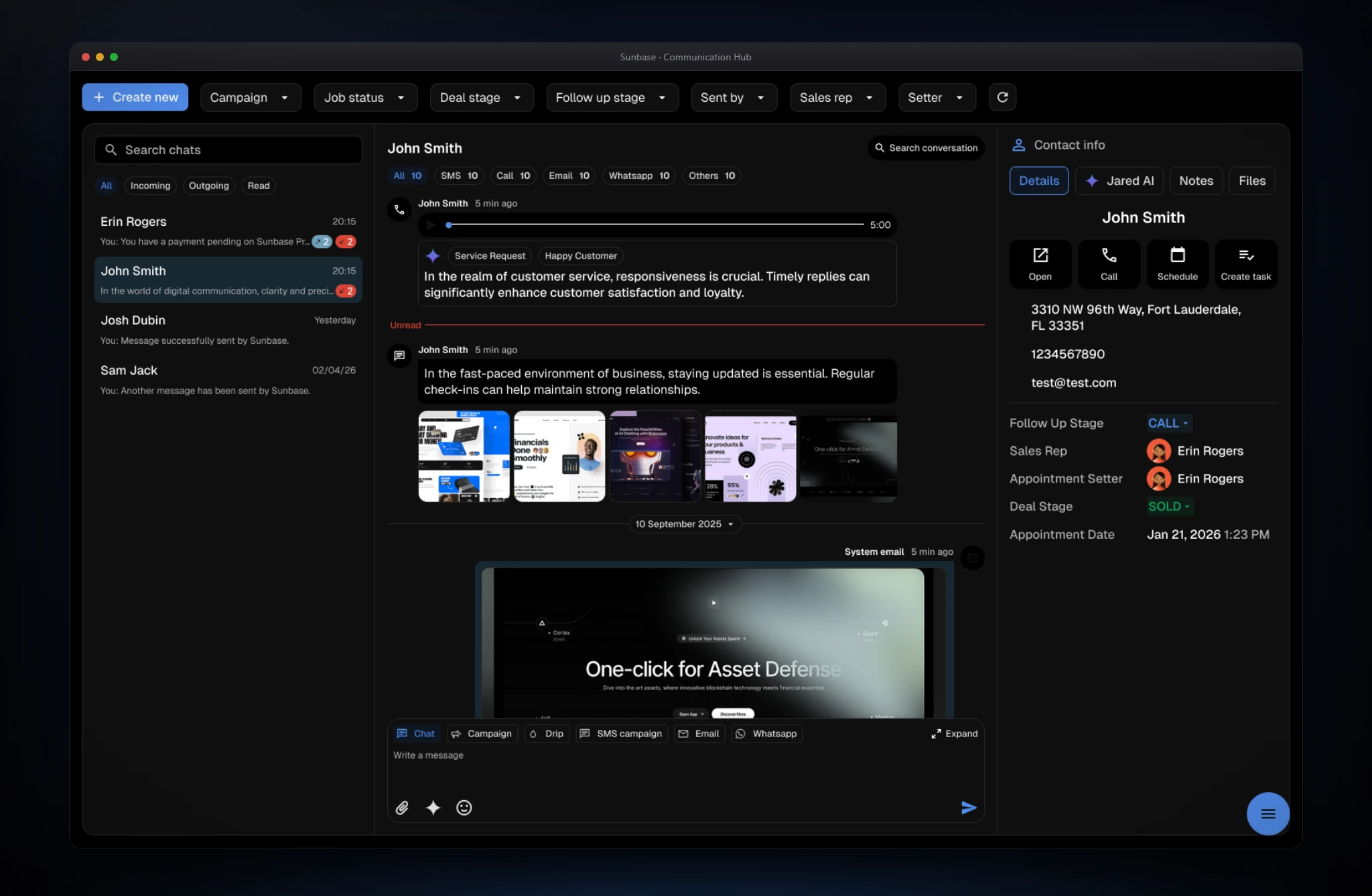
- The screen
- A tri-pane workspace: chats on the left, the conversation in the center, contact details on the right. The center filters by channel with live counts and combines messages, call recordings with waveform playback and AI sentiment tags, image galleries, and campaign emails in one time-stamped feed, with an Unread divider. The right pane holds quick actions (Open, Call, Schedule, Create task) and deal context, and the composer switches between chat, campaign, drip, SMS, email, and WhatsApp.
- The problem
- Conversations were scattered across channels and tools, so reps spent time searching for context and sometimes sent duplicate or contradictory messages.
- Design decisions
- One feed is the source of truth: everything is time-stamped and labeled by channel rather than split into inboxes, and filters isolate a source without losing history. The three panes separate navigation, conversation, and intelligence, so reps can move between clients while context stays visible. The call player sits inside the timeline with sentiment tags inline, so tone is visible without listening. Deal stage and next steps sit beside the thread, so every reply is informed by where the deal stands.
Find what was said, months later.
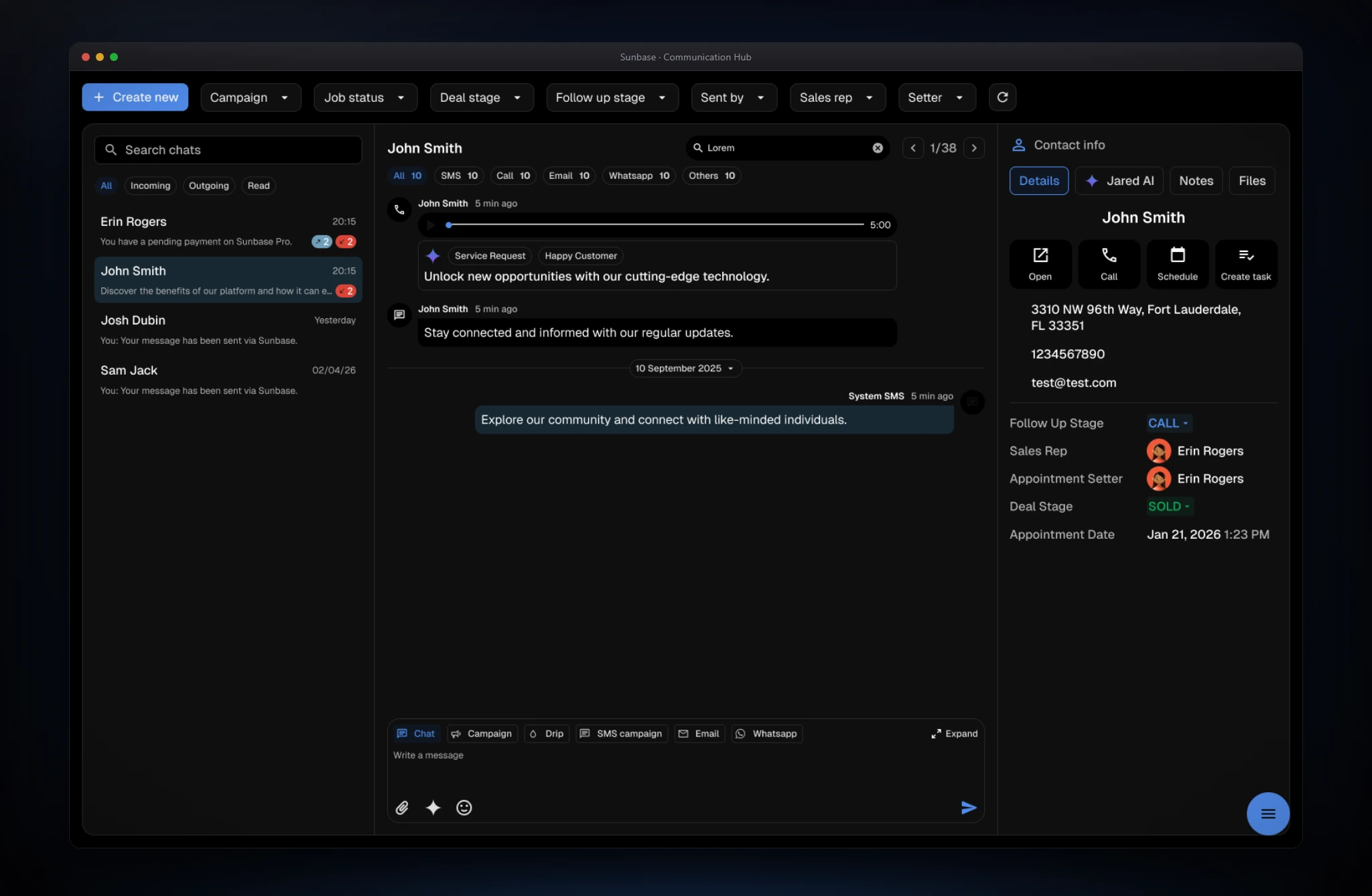
- The screen
- Search conversation opens an in-thread field with a match counter and next and previous controls (1 of 38 here). Matches are highlighted across messages from different channels, and the chat list can be searched and filtered by All, Incoming, Outgoing, and Read.
- The problem
- Contracts, site photos, and past commitments were buried in long threads, and reps couldn't quickly verify what a client had already been told.
- Design decisions
- Search is scoped to the open conversation, which is the question reps actually ask, while global search stays in the top bar for finding clients. A counter with step-through turns a long history into a short list of hits, and highlighting keeps each match in context instead of moving to a results page. The pattern is identical across SMS, email, and WhatsApp because the feed is unified.
AI that assists in the thread instead of replacing the rep.
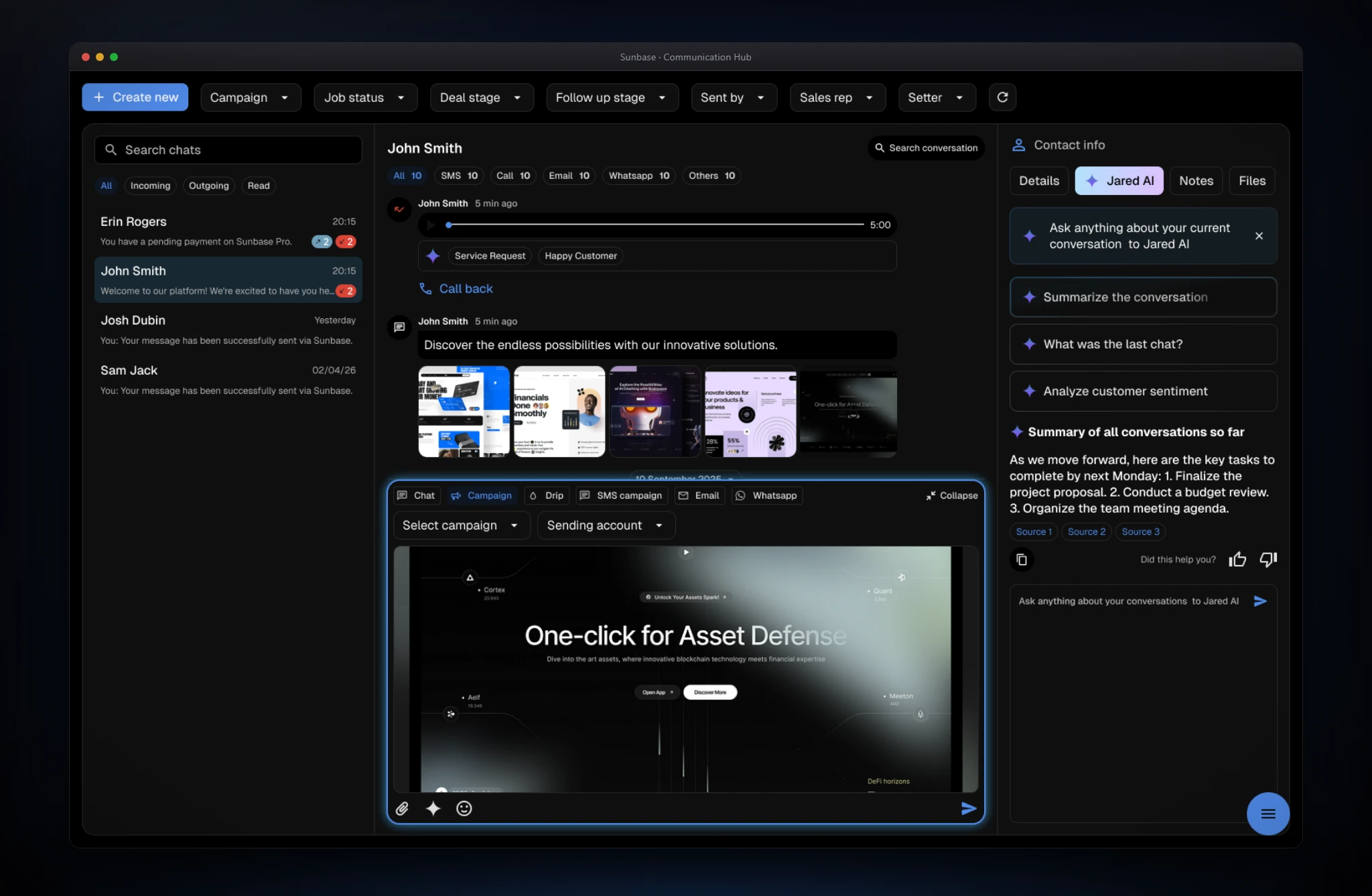
- The screen
- The Jared AI tab offers one-tap prompts (Summarize the conversation, What was the last chat?, Analyze customer sentiment) and a free-text field. Answers appear as a titled summary with action points, numbered sources, copy, and thumbs-up and thumbs-down feedback. Below the thread, the composer's campaign mode lets reps send a prepared campaign from the same screen.
- The problem
- Reps couldn't get up to speed on long threads, and handing a client to a teammate meant reading months of messages. Teams also didn't want autonomous AI replying on high-value deals.
- Design decisions
- The copilot sits in a tab beside the conversation, available without leaving the record. Suggested prompts cover the common questions and lower the effort of using it. Answers cite numbered sources so reps can verify them, and feedback controls capture whether a summary was useful. Output is a suggestion a person reads and sends, keeping the rep in control, which is what teams asked for in discovery.
Team discussion and notes that never reach the client.
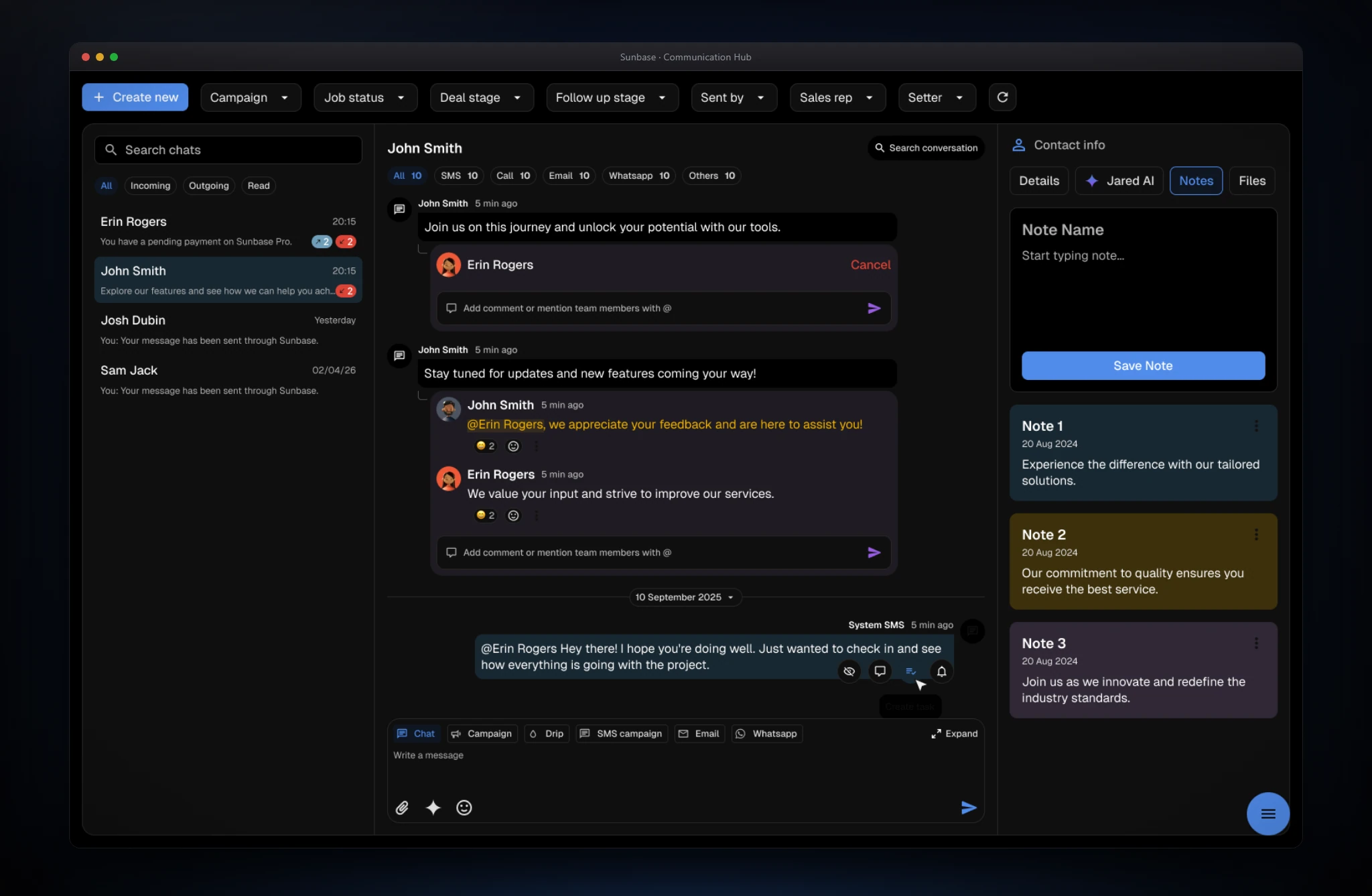
- The screen
- Internal comments attach to a message in a visually distinct card, with a field that supports @mentions, replies, and reactions. In the right pane, the Notes tab has a new-note form above color-coded, dated persistent notes.
- The problem
- Internal questions and handoffs forced reps into chat tools, and internal comments risked leaking into client-facing messages.
- Design decisions
- Internal content is separated from client-facing messages by distinct tokens: private threads use a different surface and card treatment, and @mentions get their own highlight, so the two are hard to confuse. Discussion sits on the message it is about, so context travels with it. Persistent notes get their own tab, apart from the chronological thread, because they describe the client rather than a moment.
Draft in the right tone and retrieve any file in seconds.
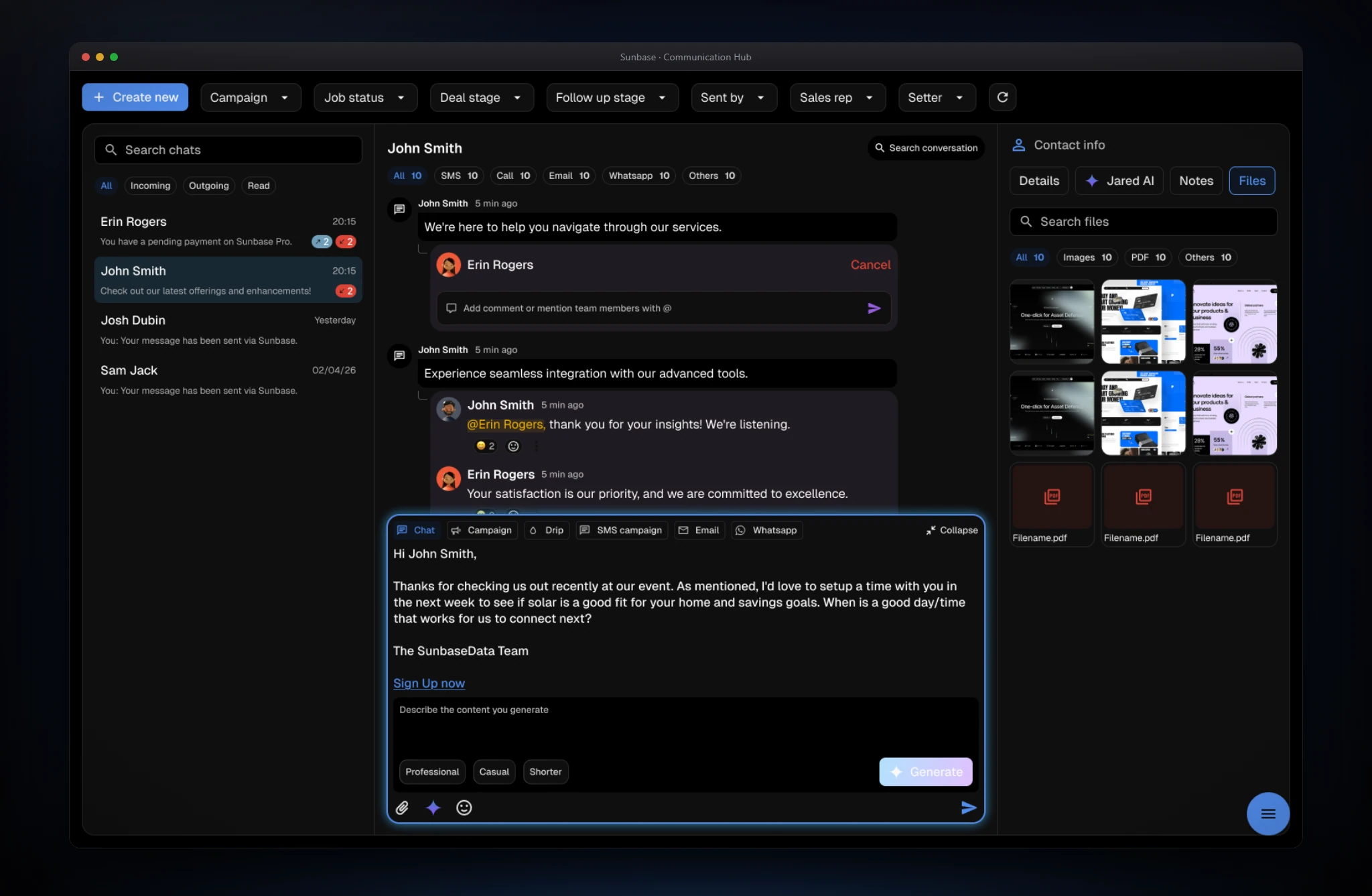
- The screen
- The expanded composer opens an AI drafting area with a message body, a prompt field, tone options (Professional, Casual, Shorter), and Generate. The Files tab lists shared attachments with search, All, Images, PDF, and Others filters with counts, thumbnails, and named documents.
- The problem
- Writing consistent replies took time, and contracts, site photos, and invoices were hard to find in unstructured threads.
- Design decisions
- AI drafting lives in the composer, so the result lands as an editable draft rather than sending on its own, and tone is a tap, not a prompt-writing exercise. The Files tab organizes media by type with search, so retrieval doesn't require scrolling the thread. Uploads load progressively, so reps can keep working while attachments finish.
Edge cases & logic
Cross-channel duplicates are grouped by phone number and email into one master client identity, preserving channel labels. Internal notes use distinct visual tokens and @mention styling so they can't be mistaken for client-facing messages. Large uploads load progressively so reps keep working, and role-based permissions protect financial documents, deal stages, and assigned-client data.
Reflection & next steps
AI adoption rises when the intelligence lives inside the workflow. Jared AI worked because reps could summarize, search, and draft without leaving the conversation. Next: live voice-call transcription with automatic action items, and real-time multilingual translation for WhatsApp and SMS. The Communication Hub turned fragmented client communication into a searchable operating system, improving response speed, preserving context, and making collaboration safer.